
The best 3D printers to buy in 2023on October 18, 2023 at 14:25 Tech Advisor
3D printing is a great hobby. Whether you want a printer entirely for the fun of it or maybe for a side hustle, one of our recommended printers below should appeal.
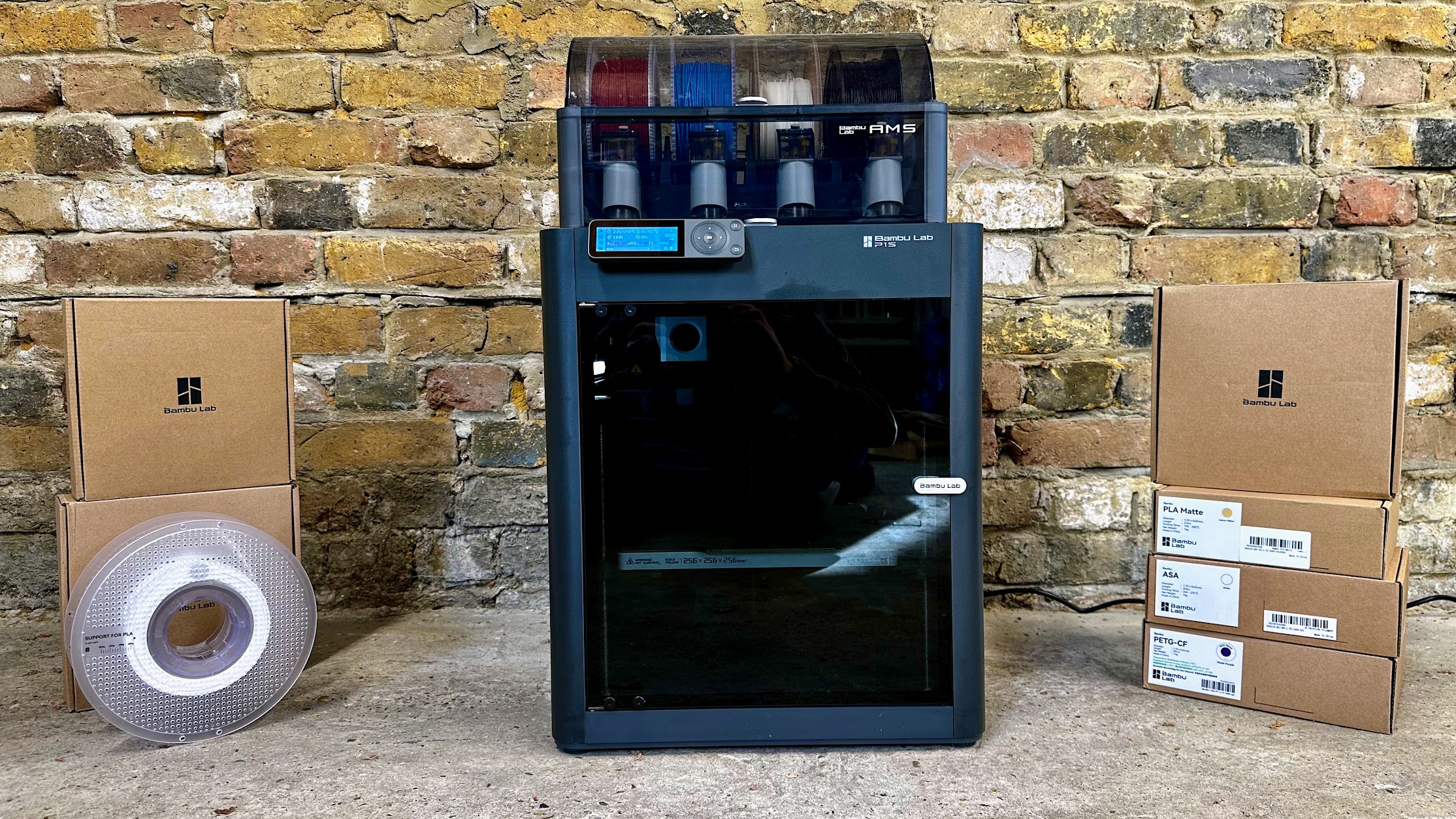
We’ve covered a variety of budgets, from entry-level $250 / £250 models up to the multi-colour Bambu P1S.
Beginners should be aware that there is a learning curve, even if you buy a 3D print with mod-cons such as automatic bed levelling and a nice colour touchscreen.
The other thing is that consumer 3D printers are single-nozzle devices which means they can print one colour at a time. You can stop a print, load a different colour and continue, but because of the way that they print one layer on top of the previous one, colours can only change throughout the height of the thing you’re printing.
Bambu’s P1S Combo is the exception, as it can change colour whenever it needs to, but it’s still limited to a single nozzle and having to change colour multiple times on each layer can add many hours to print times and end up wasting a lot of filament. Printers with multiple nozzles exist, but they’re far too expensive for most consumers to justify buying.
Speed is one area that has improved recently. Traditionally, even a small object could take several hours to print and large ones a day or two. Some of the printers here are 7-10x faster, which reduces times significantly, without affecting print quality.
One other thing: until you’ve spent time getting to grips with a 3D modelling app such as Adobe Fusion, you’ll be limited to printing objects that other people have designed. There are lots of them, but if you want something bespoke, you’ll have to create it yourself, and that has its own steep learning curve.
Don’t be put off buying a 3D printer, though. Choose wisely and you’ll be rewarded with a device that can print intricate, articulated models from the off.
We’re focusing mainly on FDM (fused deposition modelling) printers here because these are the most popular type. The other type is a resin 3D printer, such as the Creality Halot One Plus, which works very differently, and are designed for printing small, intricate, solid models.
1. Bambu P1S Combo – Best overall 3D printer
Pros
Excellent print quality
Automatic colour changing
Fast CoreXY motion system
Cons
Basic non-touchscreen control panel
Filament wastage can be high in multicolour printing
No failed print detection
Price When Reviewed:
£869
With so many tech products you get what you pay for. This inevitably means the “best” will also be the most expensive. It’s certainly the case here, but just because the P1S is more expensive doesn’t mean it isn’t still good value.
The highlight is that it comes with Bambu’s AMS, a unit that sits on top of the P1S printer and holds four spools of filament and can load and unload them automatically. That means this printer is the only one here, and pretty much the only consumer-level 3D printer that can print in multiple colours without any help from you.
With only one nozzle, multicolour prints aren’t exactly churned out quickly. But the AMS also takes the pain out of changing filament when you want to print something in a different colour to the previous print.
If you don’t care about multicolour, you can buy the non-Combo version of the P1S for quite a bit less.
And beyond colours, the P1S is simply a remarkably good printer. It’s really fast thanks to the use of a coreXY system, and as it’s fully enclosed it’s reliable even when printing with tricky filament types because of the stable ambient temperature. More important, arguably, is that print quality is superb.
If there’s a downside, it’s the rubbish dot-matric screen which seems very out of place on a printer this expensive. But, there are other ways to control the P1S, such as printing from a PC or phone via Wi-Fi. The Creality K1 is a good alternative if you must have a touchscreen, and it also has a few other features such as failed print detection. If you want these from Bambu, you’ll have to pay a lot more for the X1 Carbon.
Read our full
Bambu P1S Combo review
2. Creality K1 Max – Best large build volume 3D printer
Pros
Fast, reliable printing
Large build volume
Fully automated bed levelling
Cons
Some features exclusive to Creality’s slicer
No multi-colour capabilities
Price When Reviewed:
£859
Some may say the K1 is just a poor copy of the Bambu P1S, but that does it a disservice when so many 3D printers are basically copies of each other. There are two models, the smaller K1 which is cheaper than the larger K1 Max.
The Max offers a 300x300x300 build volume, something not currently available from Bambu and it has an easy-to-use touchscreen. Bed levelling is fully automatic and it even has a LiDAR system that helps ensure prints are successful and good quality.
There’s built-in Wi-Fi and an ‘AI’ camera that can detect when prints are failing, as well as when you might have accidentally left a model or some tools on the build plate.
As both K1 and K1 Max use coreXY systems, they’re just as fast as the Bambu and although quality isn’t quite up to the P1S’s level, it’s still very good.
Read our full
Creality K1 Max review
3. Elegoo Neptune 4 – Best budget 3D printer
Pros
Fast printing
Automatic bed levelling
Intuitive touchscreen controller
Cons
No Wi-Fi
More expensive in UK than US
Elegoo’s slicer isn’t the best
Price When Reviewed:
£349.99
The Neptune 4 offers everything most people are looking for in a first 3D printer. It’s easy to set up, has auto bed levelling, a colour touchscreen and is pretty fast to boot.
That’s already a lot for the low price, so it’s not too surprising it doesn’t have Wi-Fi. Unlike some of the budget models here, it competes with the coreXY printers for speed thanks to an upgraded print head with much improved cooling over the Neptune 3.
It’s a shame that like the Ender 3 S1 Pro levelling isn’t completely automatic, but once you’ve adjusted the knobs, subsequent levelling is automatic.
Print quality is very good at the default 300mm speed, but it’s a good idea to use an alternative to Elegoo’s slicer which caused us quite a few headaches when prints failed.
Read our full
Elegoo Neptune 4 review
4. Creality 3D Ender 3 S1 Pro
Pros
Great print quality
All the features you’d want
Cons
Auto-levelling requires manual input
Touchscreen interface could be better
Price When Reviewed:
£469
The S1 Pro might not be the budget 3D printer you’d expect from an Ender 3, but that’s because it has had all the bells and whistles thrown at it.
There’s the Sprite direct drive print head with dual metal gears for reliable extrusion. It goes to 300C, so you can print with a wide range of filaments. The bed goes up to 110C, too, which helps prints adhere when working with more awkward types of filament.
It isn’t enclosed, of course, and is a bed-slinger, so needs room in front and behind it to accommodate its range of travel. There’s a useful LED strip which is really bright, and a colour touchscreen. Its interface could be improved a bit, but it’s not bad.
Print quality is very good, but it isn’t amazingly fast. To improve it you can buy Creality’s Sonic Pad – a Klipper-based touchscreen – but this adds a lot of cost and hassle. If speed is important, choose a printer that offers 300-500mm/sec out of the box.
Read our full
Creality 3D Ender 3 S1 Pro review
5. Anycubic Vyper
Pros
Auto levelling
Touchscreen
Dual-gear filament feed
Cons
260°C max temperature
Relatively slow printing
Price When Reviewed:
£320
As already mentioned yYou tend to get what you pay for with 3D printers, and the Vyper sits right in the sweet spot. It ticks all the right boxes: (proper) auto levelling, a touchscreen, a flexible magnetic sheet for easy print removal and a decent build volume of 240x240x265mm.
It’s easy to assemble, prints reliably and offers good quality with minimal tweaking.
You’ll get better quality from Creality’s Ender 3 S1 Pro, but that’s more expensive, and you’ll forego fully automatic bed levelling.
For most people, the Vyper offers good-enough quality at a sensible price with reliable first layers every time.
Read our full
Anycubic Vyper review
6. Creality Halot One Plus
Pros
Easy to use & reliable
Works with various slicers
Great print quality
Cons
Fan runs constantly during printing
Requires post-printing cleanup + curing (like all resin printers)
More expensive than some rivals
Price When Reviewed:
£469
The Halot One Plus is an easy-to-use resin 3D printer that has a good-sized build volume, prints reliably and at high quality. It’s quite expensive compared to rivals, especially in the UK.
The Halot One Plus is a resin printer, so is very different to the others here. Instead of using filament on a reel, it prints using liquid resin which is cured, layer by layer, using UV light.
Build volume is smaller than the FDM printers here, but it’s still relatively large for a resin printer, and the screen’s high resolution means models have lots of fine detail.
The Halot One Plus printed ultra-reliably in our tests, but if you are keen on a resin printer, bear in mind that you have to clean up prints afterwards, which usually means buying a separate washing and curing device that looks a lot like a resin printer and takes up the same amount of desk space.
Read our full
Creality Halot One Plus review
7. Voxelab Aquila S2
Pros
Nozzle goes up to 300°C
Affordable
PEI sheet
Cons
Manual bed levelling
No touchscreen
Price When Reviewed:
£279
The Aquila S2 is a less expensive alternative to others here, but still has most of the features you’d want, including a PEI sheet that helps prints to stick while printing, but makes it simple to remove them afterwards.
You can print with a variety of materials, including PETG, thanks to the fact the hotend can reach 300°C and the bed 100°C.
Bed levelling, though, is manual, and there’s no touchscreen: the colour screen is operated using a knob.
When you’ve levelled it, though, prints are great: we had success with several print-in-place models, but like most of the printers here, you may find intricate models require a raft to succeed.
Read our full
Voxelab Aquila S2 review
8. Creality Sermoon V1 Pro
Pros
Enclosed
Very easy to use
Auto levelling
Cons
Small build volume
Relatively expensive
Price When Reviewed:
£479
Most 3D printers are open, but the Sermoon is fully enclosed. This, and the fact it has a touchscreen interface designed for beginners, means it’s well suited to kids.
There’s a safety feature that pauses printing when the door is opened, but the enclosure also means you should be able to print with warp-happy materials more easily.
However, that isn’t quite the case as the heated bed can reach only 80°C, but you really need 100°C for ABS.
The build volume of 175 x 175 x 165mm is smaller than others here, but there is a built-in camera so you can keep tabs on your prints when you’re not in the same room, and an LED strip lets you see what’s printing.
If you’re after a 3D printer that arrives fully built and is relatively simple to use – and you mainly want to print using common PLA filament, it could be ideal. The main issue is the high price, but if that’s not a hurdle, then it’s a decent choice.
Read our full
Creality Sermoon V1 Pro review
3D printers: a buyer’s guide
Since printers all tend to look the same at first, here are some things you should look out for when choosing.
Auto levelling
Unless the surface on which objects are printed is perfectly level, prints won’t stick to it and will fail sooner or later.
Manual levelling is a chore you could probably do without, so go for a printer with auto levelling. But be careful. Some printers claim to have auto levelling, but rely on you to do a lot of the work. Which is why it pays to read reviews as well as knowing what to look for.
Heated bed
Almost all 3D printers have them, but a few still don’t. A heated bed will help prints to stick: don’t buy a printer without one.
PEI sheet
When prints do stick, they can be difficult to remove from the bed. A PEI (polyetherimide) sheet helps immensely.
Instead of a glass sheet, a flexible metal sheet with a textured coating is used, and held in place with a magnet the full size of the print bed. When the model finishes printing, you simply lift the sheet off, flex it and the model pops off.
Touchscreen
The cheapest, most basic 3D printers use a monochrome screen with a rotary dial. Go more up market and you might get a nicer colour LCD screen, but if you can, get a printer with a touchscreen as it’s so much quicker and easier to use.
Size
A printer’s build volume tells you how big an object it can print. Assume that the actual volume is a bit smaller than the specifications, and go for one with a slightly larger volume than the biggest object you will need to print.
It can be hard to know this, and remember that a bigger volume means a bigger printer, which you’ll need space for.
Really large models have to printed in sections and glued (or otherwise fixed) together, but build volumes do vary.
Temperatures
Most people print using PLA, the most common type of filament. All 3D printers have nozzles that go up to the 220°C or so that PLA requires. But if you want to print with ABS, PETG or another type of plastic, be sure to opt for a printer that can go up to around 300°C.
Similarly, watch out for heated bed temperatures. Some won’t go beyond 80°C, but you’ll need 100°C or more for successful ABS prints.
Run-out sensor
With large models taking many hours to print and the fact that you can’t always know if there’s enough filament left on the reel to complete it, a run-out sensor can be a life saver. It does it what it says: detects when the filament runs out and halts printing automatically, allowing you to load a new reel and carry on printing.
Without one, the filament could run out and the printer will carry on printing thin air, and you’d be none the wiser.
Printers