
Android 14: Everything you need to knowon October 4, 2023 at 14:30 Tech Advisor
A new major version of Android is released every year, and it’s no different in 2023.
Predictably, the follow-up to Android 13 is known as…Android 14. Google has long since ditched the dessert names for new versions, even if they’re still used internally.
Android 14 isn’t a huge overhaul, but it does introduce several useful new features. And with the update beginning to roll out to compatible devices, here’s everything you need to know.
We now know all of Android 14’s main new features, and it’s rolling out to compatible devices. Here are all the key details you need.
When will Android 14 be released?
Google officially announced Android 14 and revealed several new features at its I/O event in May 2023, but didn’t announce a release date.
Despite several beta versions, it wasn’t until 4 October 2023 that Android 14 was officially released. As usual, this will only be for recent Pixel phones initially, with the new Pixel 8 and 8 Pro running the software out of the box.
Google has also confirmed that devices from Samsung, iQoo, Nothing, OnePlus, Oppo, Realme, Sharp, Sony, Tecno, Vivo and Xiaomi will all get the update “later this year”.
But the company that makes your phone isn’t listed above, or you have slightly older hardware, you may be waiting until 2024. It can take up to a year for all devices to get it.
Google has been a little erratic over the past few years with its releases, but they usually fall after the summer. Here’s when the last full versions made their debuts:
Android 13 – August 2022
Android 12 – October 2021
Android 11 – September 2020
Android 10 – September 2019
Which devices will get Android 14?
As well as the Pixel 8 and 8 Pro, Google has confirmed in an Android Developers article that the following will all get Android 14:
Pixel 4a (5G)
Pixel 5
Pixel 5a
Pixel 6
Pixel 6 Pro
Pixel 6a
Pixel 7
Pixel 7 Pro
Pixel 7a
Pixel Fold
Pixel Tablet
Google hasn’t mentioned which phones from the companies listed above (Samsung, iQoo, Nothing, OnePlus, Oppo, Realme, Sharp, Sony, Tecno, Vivo and Xiaomi) will get Android 14 this year. Newer devices are likely to be prioritised, but any handset that’s still getting Android version updates (not just security updates) will be eligible at some point.
That includes all other Android phone makers, such as Asus, Motorola, Nokia, Poco and Fairphone – all recent devices will eventually get Android 14.
What new features does Android 14 have?
Android 12 was a huge visual overhaul for the platform, and 13 added to it with some new features. It looks as though Android 14 will do the same – evolution, not revolution.
Design
Google loves AI. From its Bard chatbot to tools on Android phones such as Magic Eraser in Google Photos, artificial intelligence via software is integrated heavily into the company’s products. Android 14 is no different.
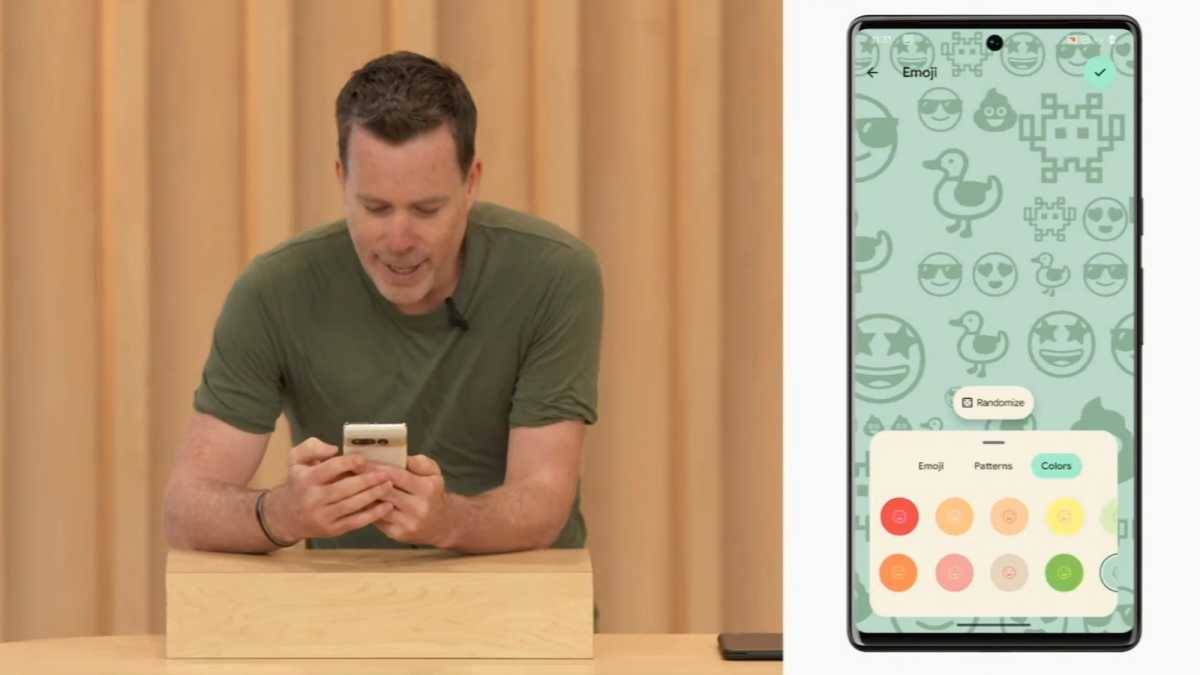
Google has taken a few notes of Apple’s iOS 16 tweaks to its lock screen wallpapers by, well, copying it. You’ll be able to change the clock style on Android’s lock screen on Pixel phones and access some widgets. There’s also a new emoji wallpaper picker that is very similar to what Apple offers.
You can choose from several custom templates, which use AI to dynamically adjust what’s on the screen. Google highlights the example of the weather widget becoming more noticeable if it’s about to change.
There will also be more AI smarts in Android 14 with cinematic wallpapers where you can select a photo from your gallery and it’ll give it a 3D effect if you set it as your wallpaper.
More impressive is new generative AI wallpapers. Again, on Pixel first, you’ll be able to type a prompt for AI to generate a unique image, for example, ‘London in a pop art style’, which will create a few images to scroll through and pick. Google is pushing the feature as a way to ensure your phone looks totally unique.
You’ll also have the option for a new monochromatic theme, which is designed to be less vivid and so easier on your eyes.
Privacy improvements
One cool new feature for Android 14 dug up by super Android researcher Mishaal Rahman is a new screen recording option that can record just one app at a time, not your whole screen. It means the recording doesn’t include screen UI elements or notifications, only recording what you do during the recording in the app you’ve selected. Check it out in his tweet below:
The privacy improvements extends to the Settings app, which will include a new section for Health Connect. This acts as a hub for all your health and fitness data, allowing you to control what each app can access from the same place.
You’ll also now get notifications when an app is sharing data such as your location with third parties, and be able to turn this off if you’d prefer.
New share sheet
The share sheet is the pop up that appears when you tap share within any app. We quite like how it appears on iPhones, with frequent contacts and apps listed first in a fairly uniform nature, whichever app you’re in. The Android share sheet has always been a little more chaotic, but Google is addressing this in Android 14.
The sheet will now give developers the ability to code in more personalised suggestions, such as emailing a link to a regular contact, or sending your Wordle score to that Wordle WhatsApp group you’re in. It will hopefully become better at guessing your intent.
You’ll also be able to scroll a preview of several images if you’ve selected many, to make sure you’re not sending the wrong thing to the wrong person. Google will also reportedly now be able to update the share sheet’s behaviour more frequently as the system now treats it as a standalone app. It’s a small tweak, but one you may use fairly often.
Improved accessibility
Google also wants to make Android easier to use for those with sight or hearing difficulties.
In Android 14, you can use the regular pinch gesture to adjust the level of magnification, and change the size of the area you’d like to make bigger. You also don’t have to manually apply this each time, with a new option to keep it on when you switch apps.
Elsewhere, there’s a new way to set up hearing aids in settings and shortcuts for quick access to key controls. And just like the classic notification LED, you can use the flashlight next to the camera to indicate notifications, rather than the usual sounds or vibrations.
Predictive back navigation
If you’ve ever been frustrated by tapping the back button or using the swipe gesture to navigate to a previous page but find you’ve quit the app instead, then Android 14 will fix this problem.
With apps all applying the back gesture differently, there’s not always a joined up behaviour that the user can trust. With the new predictive back navigation, you will now see a sneak peak of the home screen appear before you finish your command, so you’ll know whether you want to do that or not.
Sounds a bit complicated, but in operation it should be simple and save you from inadvertently leaving an app. The feature was actually built for Android 13, but it seems that time ran out before that version launched, so it will now make its proper debut in Android 14.
Satellite calls
In a tweet back in September 2022, Google’s Senior Vice-President for Android, Hiroshi Lockheimer, stated that his team were enabling the ability to connect to satellites in “the next version of Android”.
Google hasn’t confirmed it, but this presumably means Android 14 will let you make emergency calls using satellites, even when you don’t have signal. Leaker @GooglePixelFC indicated it’d be exclusive to Pixel and Samsung Galaxy phones initially:
Related articles
Android, Smartphones